You can use your
mouse to hover over the different fields on the client setup window
to display text explaining what each field is for.
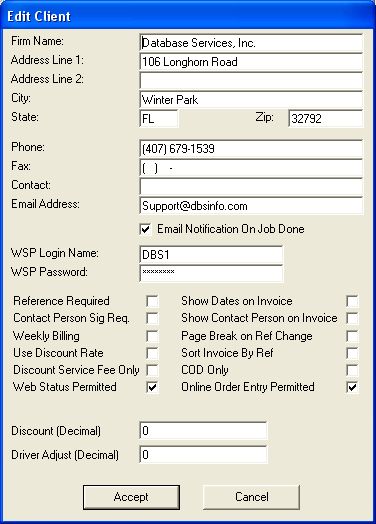
- Firm Name: Type the name of your client's firm in this field.
- Address Information: Enter the address for where your client's invoice is to be sent.
- Phone & Fax: Enter the Phone & Fax numbers for reference purposes.
- Contact: Enter the name of a specific Contact Person at your client's firm.
- WSP Login Name & Password: COMING SOON! With the Web Services Package you will soon have the ability to email your clients when a job is completed!
- Reference Required: If checked, then your client REQUIRES a reference number to be entered on each new job.
- Contact Person Sig Req: If checked, then your client REQUIRES that you log the name of the person who accepted the delivery in CST.
- Weekly Billing: If checked, you will bill this client on a weekly basis. In CST you can bill on a weekly or monthly basis.
- Use Discount Rate: If checked, then your client will receive a discount for each Invoice generated.
- Discount Service Fee Only: If checked, your client will only receive a discount on the amount of the Service Fee.
- Web Status Permitted: (WSP Feature) If checked, your client can access the status of their jobs, using the WSP login name & WSP password.
- Show Dates on Invoice: If checked, the "Release" & "Drop Off" dates will print for each job on your client's invoice.
- Show Contact Person on Invoice: If checked, the "Contact Person" will print on the invoice. The Contact Person is who the package was delivered to.
- Page Break on Ref Change: If checked, then each jobs with the same Reference Number will be included on their own page.
- Sort Invoice by Ref: If checked, the jobs on the invoice will be sorted by the reference number.
- COD only: If checked, the job will remain on the dispatch screen until the funds have been collected for each job.
- Online Order Entry Permitted: (WSP Feature) If checked then your client can add their own runs over the internet.
- Discount (Decimal): Enter the amount that you want to discount your client's invoice. (amount must be in decimal format)
- Driver Adjust (Decimal): If you give your client a discount & want to adjust what the driver is paid, enter the adjusted amount (for example, if you discount your client 10% & want to adjust the driver's rate the same, enter .10)